BrowserPod 4.0: the microVM that runs in the browser, now free for any use


Today we are releasing BrowserPod 4.0, the latest version of our Linux-like microVMs for the browser, powered by WebAssembly.
It brings new networking capabilities, more built-in programs, and most importantly: you can now use it as a library completely for free.
This means that you can simply install BrowserPod from npm and call BrowserPod.boot in your page to give your user a private, isolated, zero-cost microVM that runs on their own device.
No account or API key is required, and there is no metering and no telemetry. It is free for any purpose, including commercial and production use.
The demo below is a Pod running a bash process. Feel free to poke around, run programs, or delete the whole filesystem:
What is BrowserPod

BrowserPod is a microVM that runs in the browser, built on WebAssembly.
At its core it is a Linux-like kernel, written from scratch for the web platform, and isolated by the browser’s sandbox. We have described the architecture in detail in a previous deep dive. On top of this kernel run WebAssembly binaries, compiled from the original unmodified sources of the respective programs. We currently support Node.js, Rust programs, git, bash, npm and pnpm, with Python in preview and Go coming soon.
Processes run in parallel, each in its own Web Worker, and share a unified view of a virtualized system, including a streaming filesystem that loads data on-demand and can persist any change locally between visits.
Like a microVM, it starts near-instantly and keeps a small footprint. It gives applications a whole Linux system to work with. And since it runs in the browser, two things come for free:
- Zero latency. Execution is local, next to the user and next to the agent. There is no round trip to a cloud sandbox, so you get instant feedback.
- Infinite scalability at no cost. The user’s device does the work, so there are no cloud costs that grow with your user count.
We built BrowserPod for three main use cases:
- AI agents. An agent writing a web app can add BrowserPod and run code in it by itself.
- In-browser IDEs, playgrounds, documentation and demos. We’ve done this ourselves, BrowserCode
 , our free coding and agent playground, runs on BrowserPod.
- Platforms that embed AI-assisted development in their own product, and want code to run on their users’ machines rather than on a fleet of servers.
BrowserPod does not replace cloud sandboxes: headless, long-running and GPU workloads belong on servers. BrowserPod is for interactive work, next to the user.
Free for any use
BrowserPod 4.0 comes with a new licence, the BrowserPod Community Licence. In short:
- Free for any use. Personal, commercial and production, for companies of any size, open-source projects and AI agents. No usage limit, no fee, nothing metered.
- No account, no key, no call-home.
npm install @leaningtech/browserpodis all you need. The runtime loads from our CDN and sends us no telemetry. - Immutable releases. Every published runtime version is immutable and stays available, so an application pinned to a version keeps working forever.
Self-hosting, vendoring or redistributing the runtime needs a BrowserPod Enterprise Licence: get in touch.
Why
Until now, BrowserPod was a hosted service. To boot a Pod you signed up, created an API key, and every hour of compute was metered.
The technology worked, but the model created excessive friction, and the reason for it was networking.
From the beginning we wanted BrowserPod to Just Work, with minimal setup, and networking is the hardest part of that: anything beyond a toy demo needs networking of some kind, and browsers heavily restrict what you can do from a page.
We learned this with WebVM. As soon as people had a Linux system running in their browser, the first thing they wanted was to reach the internet from it, and to this day the number one support question we get for WebVM is how to set up its Tailscale integration.
For this reason BrowserPod came from day one with a managed proxy, which allows a Pod to send traffic without being restricted by the browser’s CORS rules. Receiving traffic from the internet is also included, so that you can showcase your project to a friend, or test it on your phone.
While this is very handy, operating a proxy costs money and comes with auditing responsibilities in case our infrastructure is used for nefarious purposes. So booting a Pod had to be tied to a registered user and an API key.
This is unnecessary friction for the many use cases that don’t need unrestricted internet access. So in BrowserPod 4.0 the proxy becomes an optional service with its own name, BrowserPod Edge, and everything else is free to use without an account.
If you already use BrowserPod, nothing breaks. Your account is now a BrowserPod Edge account, and your API keys and plan keep working. BrowserPod Pro is now Edge Pro, at the same price and with the same allowances. Your tokens now pay for Edge networking rather than compute.
New networking features
For BrowserPod 4.0, we expanded our networking capabilities in two directions:
- A new fetch network, which needs no API key: outbound requests are made by the browser’s
fetch(), or by your own custom fetch implementation - The Edge network, our managed proxy, is not restricted to HTTP and HTTPS anymore: Pods can open TCP connections on any port, and reach the domains that you allow for each API key
Here is a quick feature comparison between the two:
| Fetch network | Edge network | |
|---|---|---|
| API key | Not needed | Required |
| Traffic goes through | The user’s browser | Our proxy |
| HTTP | localhost only | Allowed domains* |
| HTTPS | Servers that allow CORS | Allowed domains* |
| Other TCP | localhost only | Allowed domains* |
| Inbound (Portals) | Not yet | Yes |
* Free: our global allowlist. Pro: any domain, or a list you choose per key.
Fetch network
No managed proxy doesn’t have to mean no network. After all, the browser can make network requests itself, restricted as they might be. And you might have your own CORS proxy or tunnel to use.
So when a Pod boots without an API key, its outbound HTTP and HTTPS requests are made by the browser’s fetch(), directly from your page:
const pod = await BrowserPod.boot();How it works
A program in the Pod doesn’t call fetch(): it opens a TCP connection and writes bytes to it.
For plain HTTP, turning that into a fetch() call is simple enough: we parse the HTTP request from the bytes, and build a request that fetch() can send.
HTTPS is harder, because all we get from the Pod is a TCP stream of encrypted TLS traffic. To reconstruct the HTTPS request, we need to:
- Intercept the TLS handshake between the program in the Pod and the server, and do TLS termination ourselves
- Make sure that the program trusts the certificate that we will present on behalf of the server
- Parse the HTTP request from the unencrypted bytes
- Construct from it a JS
RequestInit object that can be passed to fetch()
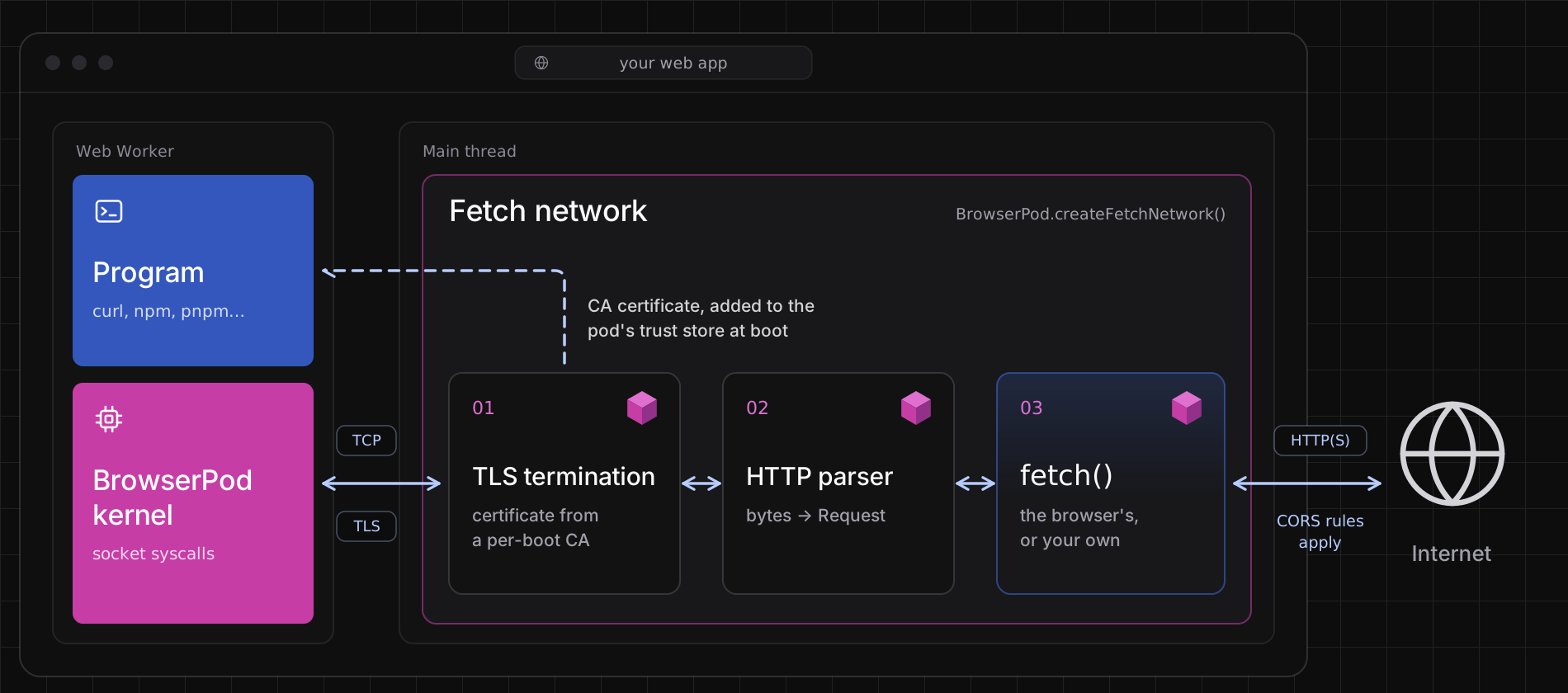
How the fetch network turns a Pod’s encrypted TCP connection into a
fetch() call, inside your page.
We implemented all of this inside of BrowserPod. Everything happens inside your own page: the certificate authority is generated at each boot and never leaves the browser, and the decrypted traffic goes only to fetch().
Customizing it
If you want to pass a custom fetch implementation, you need to explicitly construct a fetch network.
Your function receives the same parameters as fetch(): the URL and the request options. The options also include init.defaultFetch, the default implementation, so you can change the request and then let BrowserPod send it:
const network = await BrowserPod.createFetchNetwork({ fetch: (url, init) => init.defaultFetch( `https://my-cors-proxy.example.com/?url=${encodeURIComponent(url)}`, init ),});const pod = await BrowserPod.boot({ network });The browser’s rules still apply: a request only succeeds if the server allows cross-origin requests, and most sites don’t. In some cases, slightly tweaking the request can do the trick.
For example, by default npm sends a few telemetry headers (npm-command, npm-session, npm-auth-type, npm-scope). Since those are not CORS-safelisted request headers, the browser sends a
preflight request, which registry.npmjs.org does not support, and the overall request fails. Without those headers, the registry happily replies with
Access-Control-Allow-Origin: *, and the request goes through.
BrowserPod.opinionatedFetch is a fetch implementation that works around issues like this one. For now it removes npm’s telemetry headers, so that npm install and pnpm install work when you pass it to createFetchNetwork, and we will add workarounds for other sites over time.
Let us know if you think that a particular workaround should be added in there.
You can pass it as it is, or combine it with your own logic:
const network = await BrowserPod.createFetchNetwork({ fetch: (url, init) => { console.log("pod request:", init.method ?? "GET", url); return BrowserPod.opinionatedFetch(url, init); },});const pod = await BrowserPod.boot({ network });Limits
The fetch network currently does not support inbound traffic, so Portals don’t work. We plan to add support for it in the near future.
Edge network
The Edge network is the one BrowserPod always had: it routes a Pod’s traffic through our managed proxy, now called BrowserPod Edge. If you pass an API key to boot() you get it by default, or you can construct it explicitly:
const network = await BrowserPod.createEdgeNetwork({ apiKey: "your-api-key" });const pod = await BrowserPod.boot({ network });Edge has a generous free tier: see the pricing page for details.
It got some love too, with two additions.
Per-key domain policy. On the Pro plan, each API key can reach any domain, or be restricted to an allowlist of your choice.
TCP on any port. The Edge network is no longer limited to HTTP and HTTPS: on every plan, Free included, a Pod can open a TCP connection on any port to an allowed domain. Thanks to this new capability it made sense to add OpenSSH to the base image, so you can use a Pod as a real SSH client.
Here is one connecting to starwarstel.net, a public server running ASCII Movie, which plays the classic Star Wars asciimation:
New Rust utilities in the base image
Rust support landed in BrowserPod 3.0, and it has proven so solid and stable since then that we now build part of the base image with it.
Every Pod now comes with ripgrep (a grep replacement) and fd (a find replacement), two popular tools that are handy for humans and coding agents alike.
But most importantly, we added pnpm 12, the new Rust-based version of pnpm.
pnpm is a popular alternative to npm for installing and managing Node.js dependencies. It’s much faster than npm, especially when there is no pre-existing lockfile. All the demos on browsercode.io are now based on it, like this Vite project, which you can edit and run right here:
BrowserCode running a Vite template with pnpm
What’s next
We have many exciting features in our pipeline, some of which are coming very soon:
- Inbound traffic on the fetch network: this will allow Portals to work with your own reverse proxy, or fully locally via a Service Worker
- A Go toolchain: we are working on a
GOARCH=wasm32/GOOS=linuxtarget that allows unmodified Go programs to run in BrowserPod, including real multithreading support (which the official Go Wasm targets lack) - A C/C++ SDK: like we did for Rust, a sysroot and wrapper scripts around the standard compiler, to make it easier to compile your own C and C++ programs for BrowserPod
- Python native modules: loaded dynamically at runtime, like in regular Python, instead of being compiled into a single static binary. Together with the C/C++ SDK, this means that you will be able to compile and use your own native modules
Try it now
npm install @leaningtech/browserpodimport { BrowserPod } from "@leaningtech/browserpod";
const pod = await BrowserPod.boot();
const terminal = await pod.createDefaultTerminal( document.getElementById("console"));
await pod.run("bash", { terminal });That is all it takes. If you prefer to start from a working project, npm create browserpod-quickstart sets one up for you.
Or simply ask your coding agent to add BrowserPod to your app: it can now do so without any manual step.
- The documentation covers the API, networking and how to build for BrowserPod.
- BrowserCode is the quickest way to see BrowserPod at work, with framework templates and AI coding agents running in your browser.
- When your Pods need Portals, TCP or more of the internet, create an API key in the BrowserPod console to add BrowserPod Edge.
Try BrowserPod 4.0 today, with or without an API key, and let us know what you think: your feedback shapes what we build next.
Come and find us on Discord, we would love to see what you build.