
Upload and download files
How to interact with the local filesystem using the JNLP Runner extension
For a deeper dive into how file systems work in CheerpJ, check out the File System explanation guide .
.
The CheerpJ JNLP Runner extension provides a virtual filesystem that allows Java Web Start applications to read and write files within the browser’s sandbox. Since browsers cannot access your local disk directly for security reasons, CheerpJ provides two main ways to move files into and out of this virtual space.
Uploading files

To import a file from your local machine to the virtual filesystem, you can use either the built-in file picker or the extension side panel. In both cases, the files will be placed in the /files/uploads/ virtual directory. Inside the Java application, you can navigate to /files/uploads/ to open or use these files.
Using the built-in file picker:
The upload icon (an upward arrow) is present as part of the title bar on any Java window, frame, or File Dialog that opens.
- Click the upload icon in the title bar.
- Select a file from your local file system (your machine).
- In the File Dialog, navigate to
/files/uploads/and select the file to load it into the application.
Using the extension side panel:
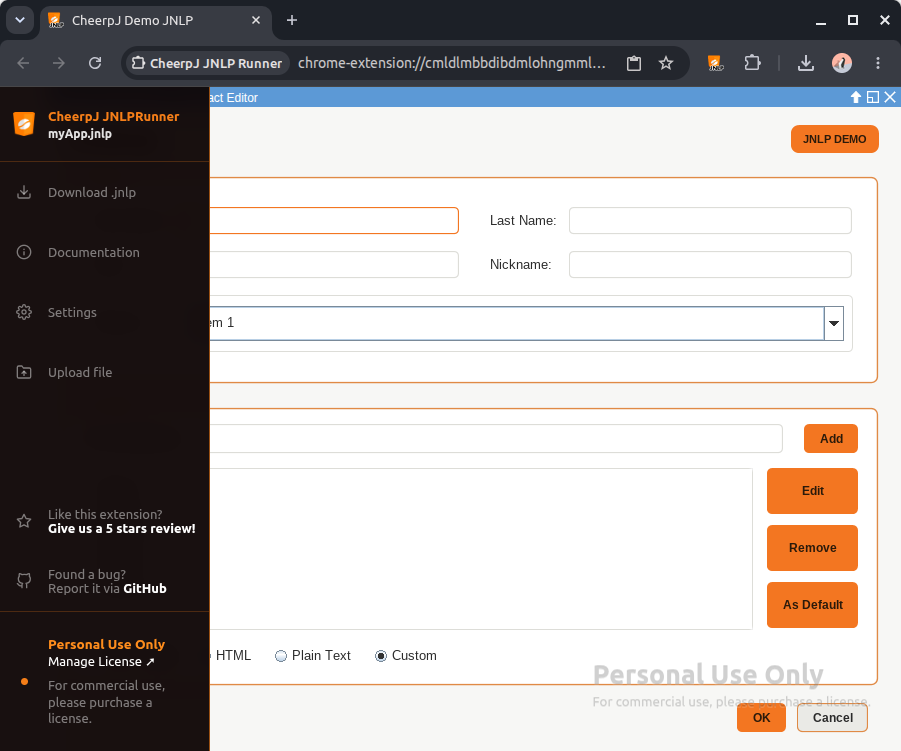
Alternatively, you can upload files directly from the extension side panel that appears on the left side of the screen while an application is running.
-
Ensure the Java application is currently running.
-
Hover over the side panel to expand it and click Upload file.
-
Select the file(s) from your local filesystem.
Downloading files
To export data from the Java application back to your local machine, simply ensure files within the application are saved to the /files/downloads/ virtual directory. Any file saved to this directory will be automatically detected and downloaded by your browser to your local machine (usually to your default Downloads folder).
Using a standard save dialog:
If you use a “Save” File Dialog and choose a path under /files/downloads/, the browser will automatically trigger a download once the save operation is complete.